
Welcome to WordPress. This is your first post. Edit or delete it, then start writing!
If you run a hotel, restaurant, or tour business, you already know how much TripAdvisor reviews can impact your bookings. They build trust, boost visibility, and can be the difference between a casual visitor to your website and a paying customer.
When I first tried displaying TripAdvisor reviews on a WordPress website, I realized how time-consuming it can be. Manually copying and pasting the testimonials looked messy, and most built-in widgets didn’t fit well with my site’s design.
After testing several methods and plugins, I finally found a solution that works well: Smash Balloon’s Reviews Feed Pro. It automatically pulls in your latest customer reviews, keeps them up to date, and blends perfectly with your site’s design.
In this guide, I’ll show you exactly how to embed TripAdvisor reviews in WordPress without writing any code, so you can highlight your best feedback and attract more customers.

Why Embed TripAdvisor Reviews in WordPress?
Positive TripAdvisor reviews can convince people to choose your hotel, restaurant, or tour company over your competitors. And showing these reviews directly on your WordPress website allows visitors to see real guest experiences without visiting a third-party site.
This helps build trust right away.
People can read genuine feedback from your past guests, which makes them more confident about choosing your business. When travelers or diners see positive reviews, they’re more likely to book a stay, make a reservation, or join a tour.
Here are some key reasons to add TripAdvisor reviews to your WordPress site:
- Keep visitors on your site — People can explore reviews without clicking away to another platform. This can also help you to get more direct bookings through your website.
- Boost local SEO — Reviews add fresh content that helps your site appear more often in local results.
- Save time on marketing — Reviews promote your reputation automatically, so you don’t need to create testimonials manually.
- Get more bookings and sales — Positive feedback encourages new customers to choose you over competitors.
Plus, I’ve spoken to many tour operators who feature customer reviews directly on their websites, and they tend to convert better. This is simply because visitors can see real proof that others enjoyed their experience.
Now, let’s start embedding TripAdvisor reviews on your WordPress website.
Here’s a quick overview of all the things I’ll share in this guide:
- Step 1: Install and Activate Smash Balloon’s Reviews Feed Pro
- Step 2: Create a TripAdvisor Review Feed
- Step 3: Customize Your TripAdvisor Reviews Feed
- Step 4: Embed TripAdvisor Reviews in WordPress
- How to Manage and Troubleshoot Your TripAdvisor Reviews Feed
- Bonus Tip: How to Show Your Google, Facebook, and Yelp Reviews in WordPress
- Frequently Asked Questions About Showing TripAdvisor Reviews in WordPress
- Keep Exploring: How to Add More Social Proof to Your WordPress Site
Step 1: Install and Activate Smash Balloon’s Reviews Feed Pro
For this tutorial, I’ll use the Smash Balloon Reviews Feed plugin. This is the best product review WordPress plugin for pulling reviews from multiple platforms, including TripAdvisor.
At WPBeginner, we’ve thoroughly tested the plugin in real WordPress setups. Check out our full Smash Balloon review for all the details.
What’s great about this plugin is that it gives you two ways to connect your site to TripAdvisor. If you prefer, you can use TripAdvisor’s official API. But for most people, the easiest option doesn’t require any code or API keys – just a link to your TripAdvisor page.
In this guide, we’ll use the simple method so you can get set up in minutes.
First, you’ll need to sign up for Reviews Feed Pro on Smash Balloon’s website. This plugin is specifically designed to pull in reviews from multiple platforms, including TripAdvisor, and display them beautifully on your WordPress site.
On the Smash Balloon website, click ‘Get Started Now,’ choose a plan, and follow the signup process.
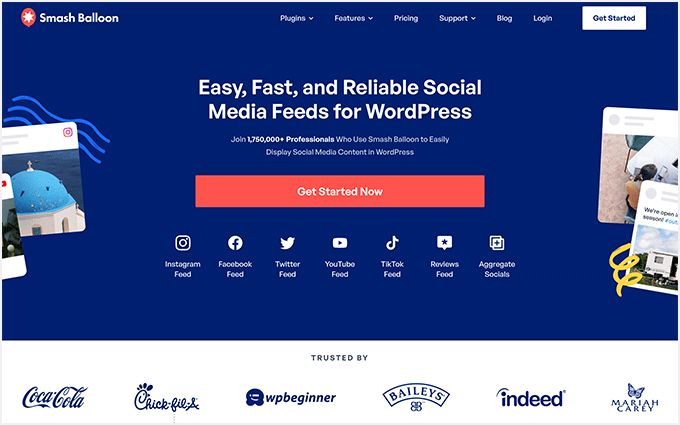
💡 Note: To display TripAdvisor reviews, you’ll need the Smash Balloon Reviews Feed’s Elite plan or the All Access Bundle that has all the Smash Balloon plugins.
After purchasing the plugin, you can download the Reviews Feed Pro file to your computer. Or you can copy the license key and store it somewhere safe.
Then, head to Plugins » Add New Plugin in your WordPress dashboard to install and activate the plugin.
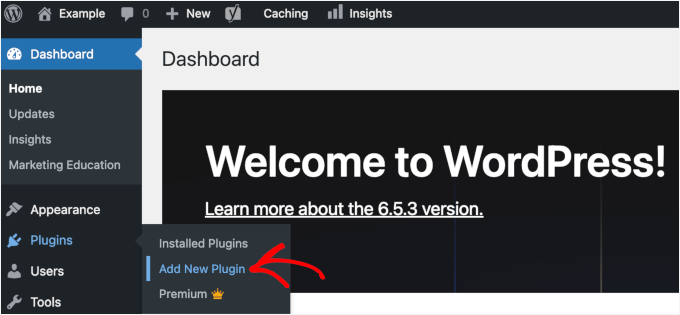
On the next screen, you can use the ‘Upload Plugin’ button to add the Reviews Feed Pro zip file.
Or you can use the search bar to quickly find the Reviews Feed plugin. Click the ‘Install Now’ button and then ‘Activate’ in the relevant search result.
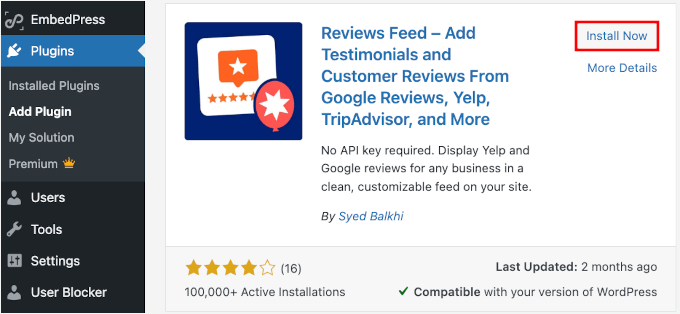
If you need help, see our guide on how to install a WordPress plugin.
Once the plugin is active, you’ll see a new Reviews Feed menu item in your WordPress dashboard. This is where you’ll manage all your review feeds and customize how they appear on your site.
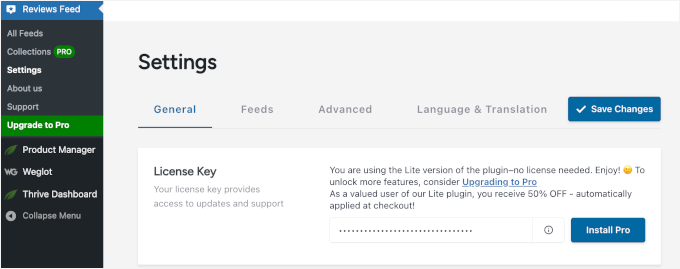
Now, let’s go to Reviews Feed » Settings.
In the ‘General’ tab, you can enter your license key and click ‘Install Pro’ to verify it. This will unlock all the Reviews Feed Pro features.
Step 2: Create a TripAdvisor Review Feed
Now it’s time to set up your TripAdvisor review feed.
To get started, you need to first navigate to Reviews Feed » All Feeds in your WordPress dashboard. Then, click the ‘Add New’ button to create your first feed.
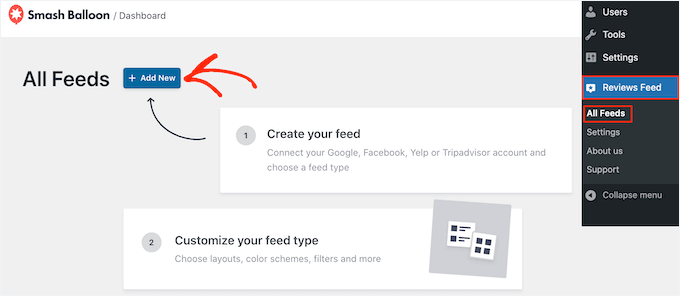
This will open the feed creation wizard that walks you through the setup process.
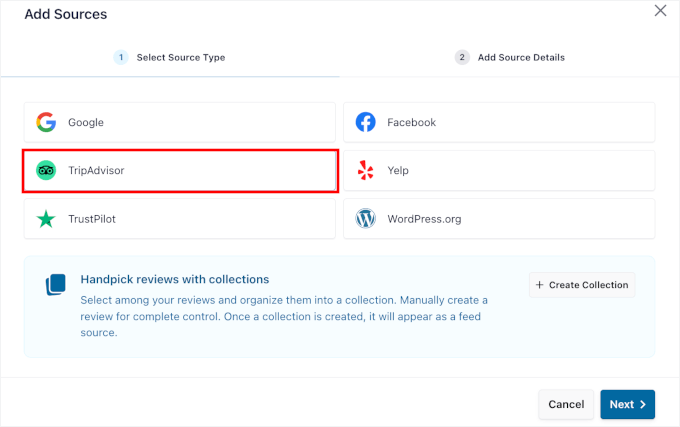
Next, click ‘Add Source’ and choose ‘TripAdvisor’ from the list of available review platforms. This tells the plugin that you want to pull reviews specifically from TripAdvisor.
Click ‘Next’ to continue to the connection settings.
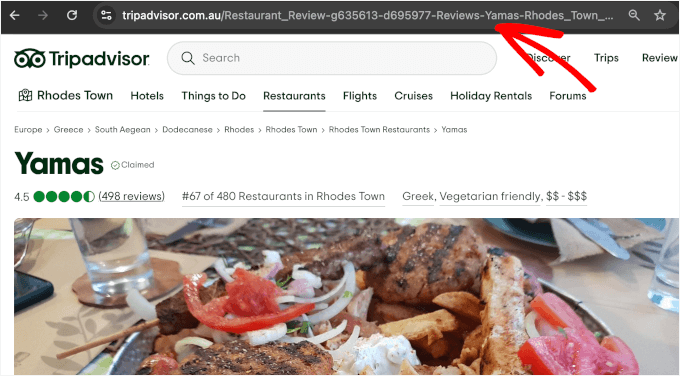
The plugin will then ask for your TripAdvisor page URL.
You can simply paste the URL of your business’s TripAdvisor page into the field provided. This is how the plugin knows which reviews to fetch. Just make sure you have the full URL to your page.
💡 Note: How does this method work without an API? The plugin acts like a browser, visiting your public TripAdvisor page to gather the latest reviews. It then formats and displays them on your site automatically.
For example, here’s what it might look like:
After entering your URL, click ‘Finish’ to establish the connection.
The plugin will test the connection and confirm that it can access your TripAdvisor reviews.

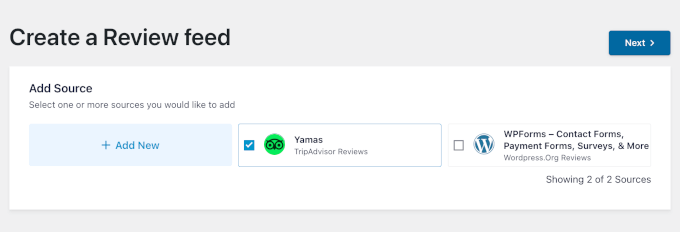
Once the connection is successful, you can click ‘Next’ to move on to the design and customization options.
This will take you to the Reviews Feed visual editor, where you’ll make your reviews look exactly how you want them on your WordPress site.
Step 3: Customize Your TripAdvisor Reviews Feed
With your TripAdvisor connection established, you can now customize how your reviews will look on your hotel, restaurant, or travel website.
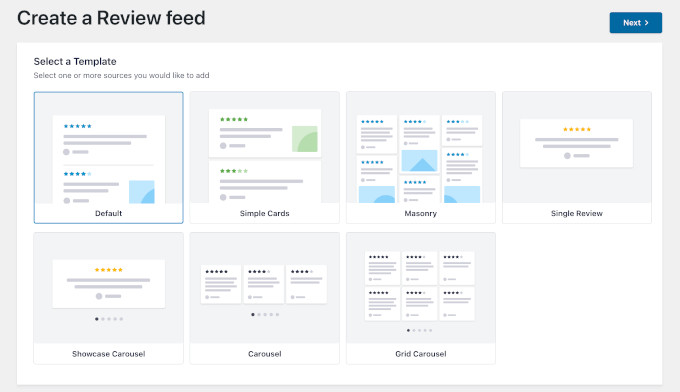
On the next screen, Reviews Feed Pro will prompt you to select a template.
Here, I’ll use the default one, but you can choose the one that fits your style best. Click the ‘Next’ button to continue.
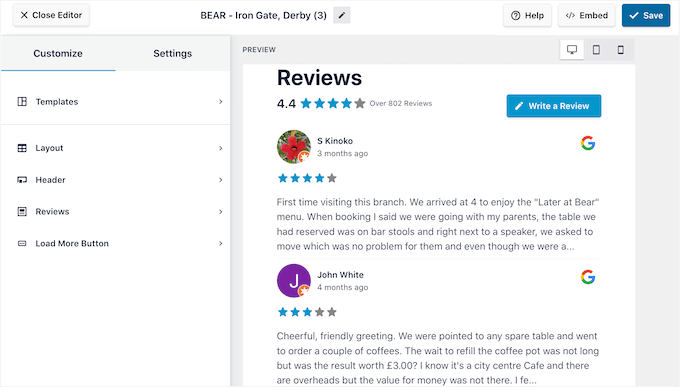
Next, you’ll see the visual feed customizer.
The customizer gives you a live preview, so you can see changes as you make them.
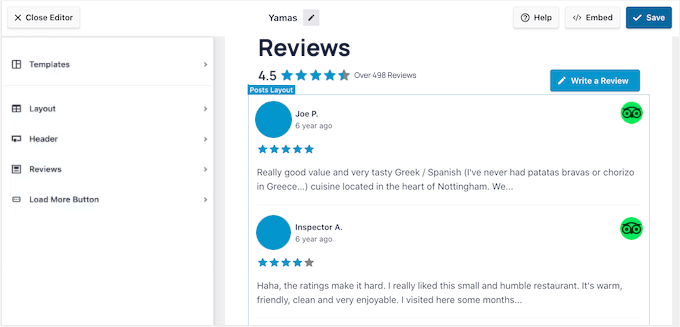
From here, you can start customizing your TripAdvisor reviews feed by choosing a template design. Simply click on the ‘Layout’ tab, and you’ll see three options:
- Default – Displays your reviews in a clean, stacked layout that works well for most websites.
- Masonry – Arranges your reviews in multiple columns for a more dynamic, grid-style look.
- Carousel – Shows your reviews in a rotating slider, which is perfect for highlighting a few reviews in a smaller space.
I went with the Carousel layout, but you can choose the one that suits your site design best.
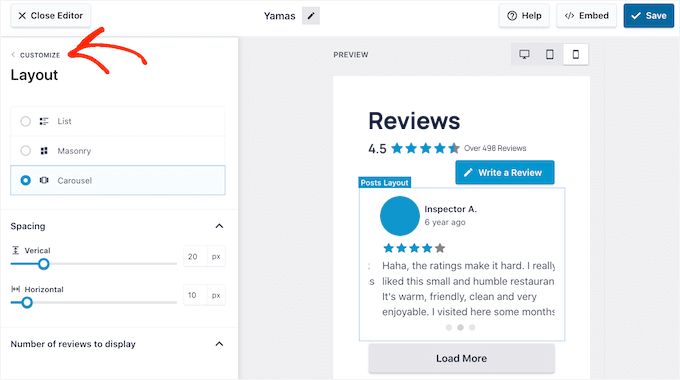
While you’re here, you can adjust other display settings, like the number of reviews to show and how much of each review text to display (on mobile, tablet, and desktops).
For the number of reviews to display, I recommend showing at least 6-8 reviews per page to give visitors a good sense of your customer satisfaction.
There are a lot more you can do on this visual editor, such as:
- Header options – Show or hide the heading, include the ‘Write a Review’ button, and display the average rating for your hotel, restaurant, or travel services.
- Post style – Choose how your reviews are displayed, either in individual boxes or in a simple, regular list.
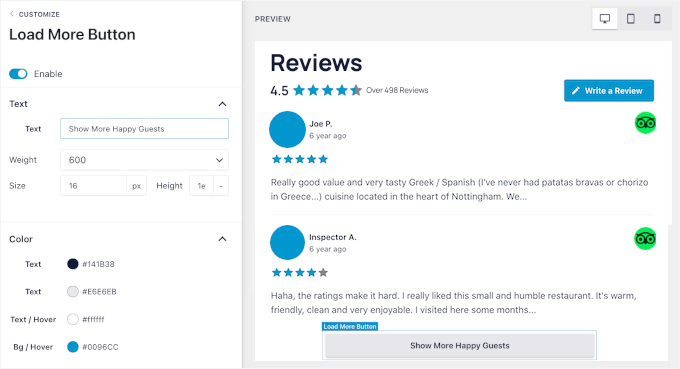
- Load more button – Add a custom call-to-action (CTA) when loading more reviews.
For each of those settings, you can customize colors, padding, and other styling details to match your website’s design.
Next, you might want to check out the ‘Settings’ page, where you can access filtering options.
This is where you can control which reviews appear on your site. For example, you might want to show only 4-star and 5-star ratings to highlight your best customer feedback.
You can even filter reviews by specific words, for example, choose only to show or hide reviews that contain certain terms.
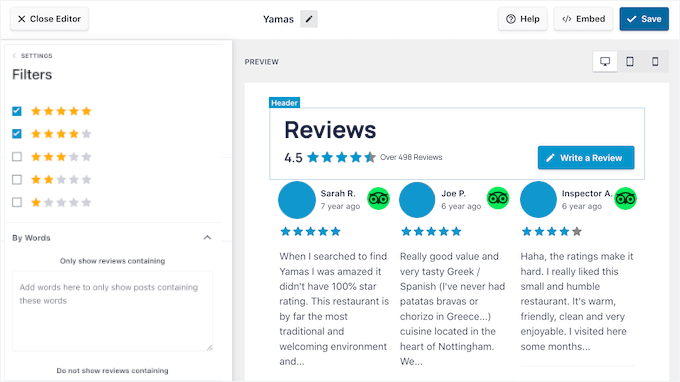
The live preview updates instantly as you make changes. This makes it easier to experiment with different settings until you find the perfect combination for your site.
There’s also a moderation option that puts you in complete control of what gets shown. When it’s enabled, you can approve or hide individual reviews before they show up on your site.
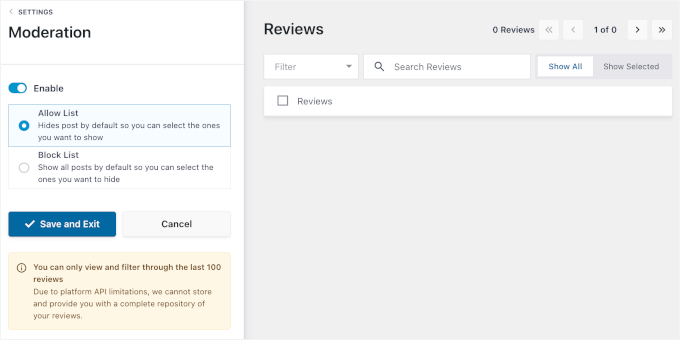
Once you’re happy with how everything is set up, click ‘Save’ to store your customizations. Your review feed is now ready to embed on your website.
Step 4: Embed TripAdvisor Reviews in WordPress
Now it’s time to actually display your TripAdvisor reviews on your hotel, travel, or restaurant website.
Reviews Feed Pro gives you two main ways to showcase your reviews: on specific pages or in widget areas like your sidebar or footer.
Let’s walk through how to do both.
Embed TripAdvisor Reviews on a WordPress Page
To add reviews to a specific page, start in the visual feed customizer by clicking the ‘Embed’ button.
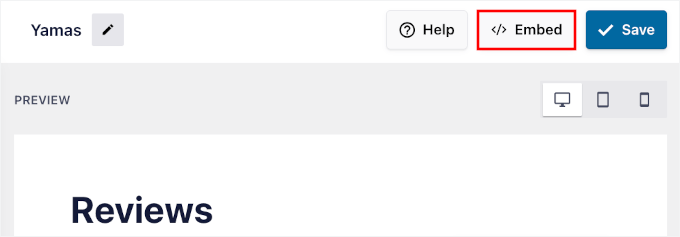
This opens the embedding options, where you can choose exactly where you want your reviews to appear.
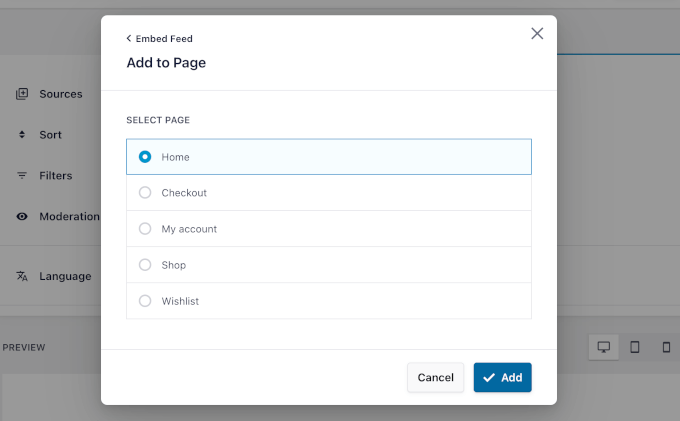
In the popup, you can select ‘Add to a Page’ and choose the WordPress page where you want your reviews to display.
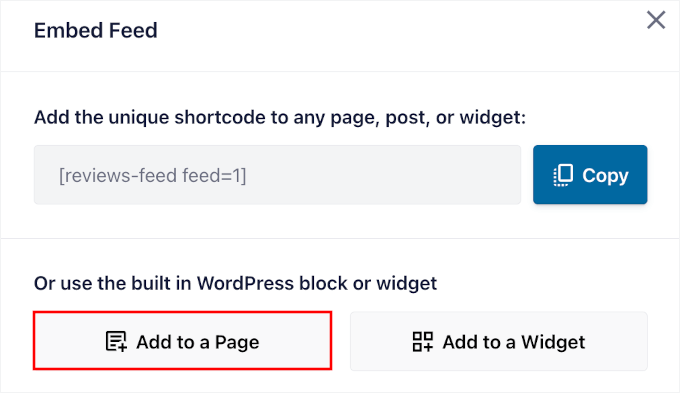
This could be your homepage, about page, or a dedicated testimonials page.
Click ‘Add’ at the bottom of the popup to continue.
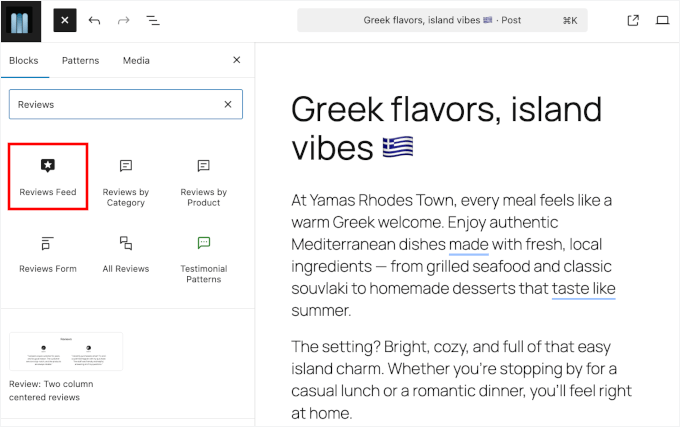
This will take you to the WordPress block editor.
Simply click the plus (+) icon and add a new Reviews Feed block wherever you prefer.
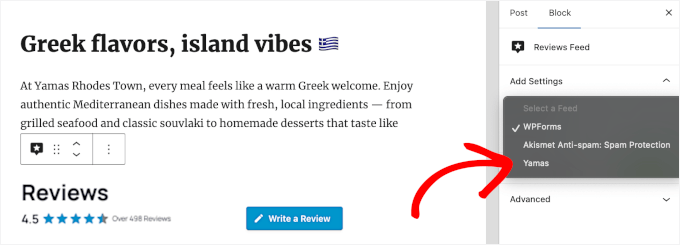
Next, if you have more than one review feed, you’ll need to select which one to add to this page.
On the right-hand panel, simply click to expand the dropdown menu and choose the TripAdvisor reviews feed.
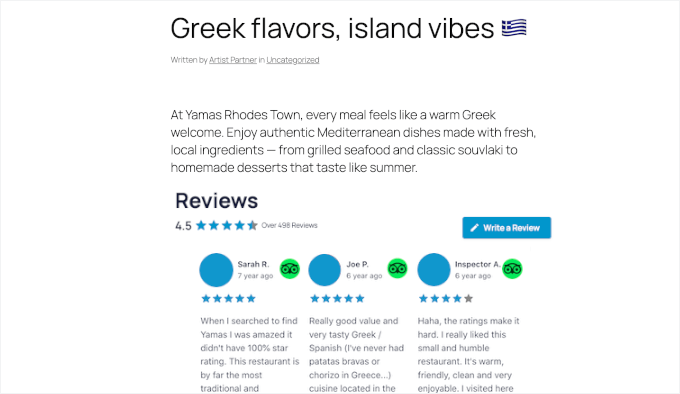
The Reviews Feed block will then automatically add the TripAdvisor reviews to your content editor.
You can go ahead and move it around to position the reviews wherever you’d like.
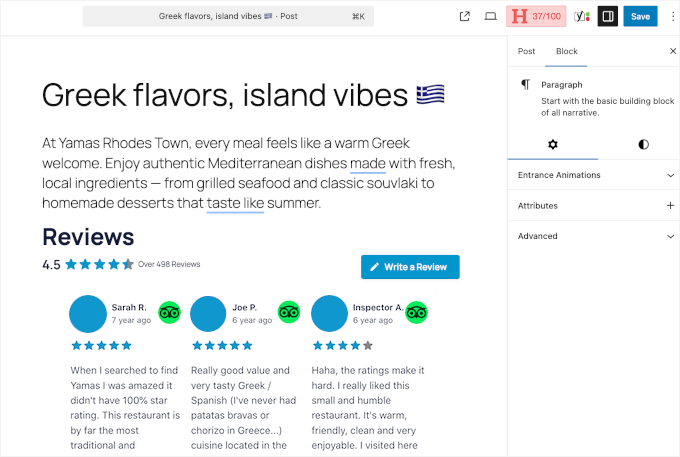
Before publishing, you can preview the page to make sure the TripAdvisor reviews feed has been added to your page content.
If everything looks good already, click ‘Update’ to save your changes and make the reviews live on your site. Visitors will now see your TripAdvisor reviews displayed beautifully on that page.
Embed TripAdvisor Review Widget in the WordPress Sidebar or Footer
For a site-wide display, you can start by clicking the ‘Embed’ button inside the Reviews Feed.
Just keep in mind that your theme needs to support widgets for this to work.
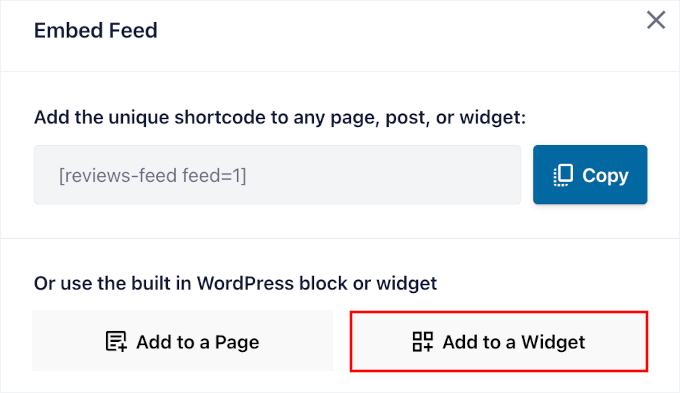
In the popup that appears, choose ‘Add to a Widget’ from the options.
This will then take you to the WordPress widget management area.
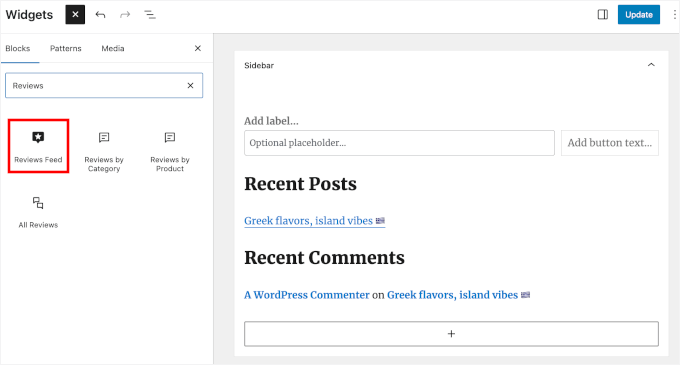
Click the plus (+) icon in your chosen widget area (like a sidebar) and search for the Reviews Feed block.
Then, go ahead and add this block to display your TripAdvisor reviews.
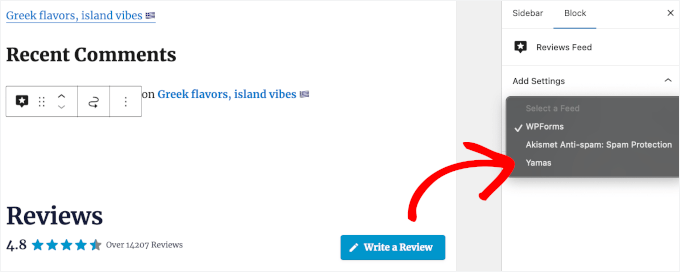
If you have multiple review feeds, you’ll need to select the one you want to embed.
In the right-hand panel, open the dropdown and click on the TripAdvisor reviews feed you just created.
You’ll then see the reviews in your widget management area.
With that done, click the ‘Update’ button to save your widget settings.
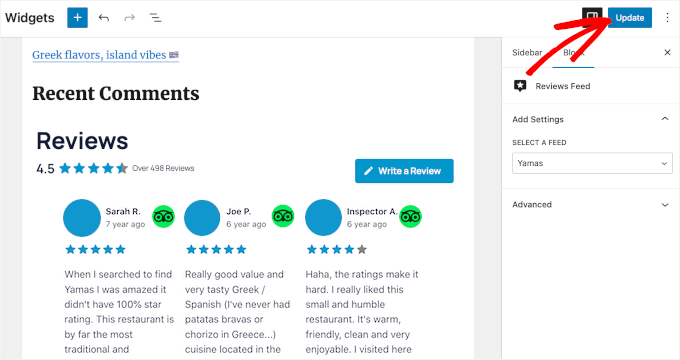
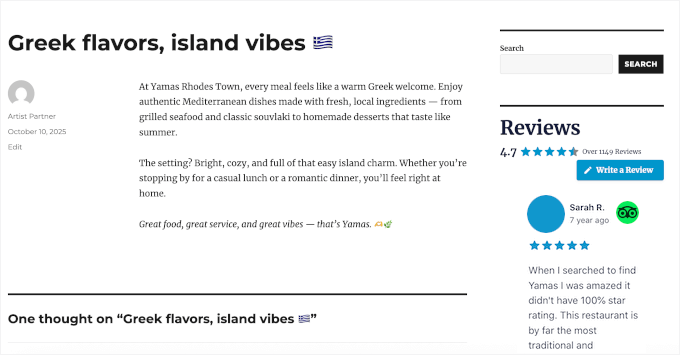
Your TripAdvisor reviews will now appear in the sidebar (or footer) of every page on your site, giving you maximum visibility for your customer feedback.
This is how it looks on our demo site:
Expert Tip: If you don’t see any widget areas on your website, then you may be using a newer block theme. You can read our guide on how to use the full site editor for more information.
How to Manage and Troubleshoot Your TripAdvisor Reviews Feed
If you run into any errors with your review feeds, you will want to quickly fix them. Here are some common scenarios and simple tips to help you update your reviews with ease.
Reviews Feed Not Displaying
The reviews not displaying can happen for a few reasons.
You can start by checking that your feed is set to ‘Published’ and that you haven’t accidentally set filters that exclude all your reviews.
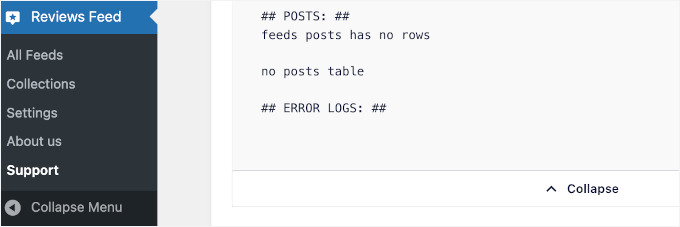
If reviews still aren’t showing up, go to Reviews Feed » Support and look at the System Information. You can find Error Logs at the end of this panel, so you can see if any issues are preventing the plugin from fetching your reviews.
New Reviews Not Appearing Immediately
If you’ve just received a great new review on TripAdvisor and don’t see it on your site right away, don’t worry.
To keep your website running fast, the plugin caches your reviews (stores them temporarily).
For details on how to fix this, you can see our guide on how to clear the cache in WordPress.
Troubleshooting an Optional API Connection
While this guide uses the simple URL method, Reviews Feed Pro also offers an optional API connection for developers. If you chose to set up your feed using that advanced method and your reviews stop displaying, the issue may be with your API credentials.
To fix this, go to Reviews Feed » Settings and navigate to the TripAdvisor section to ensure your API keys are correct.
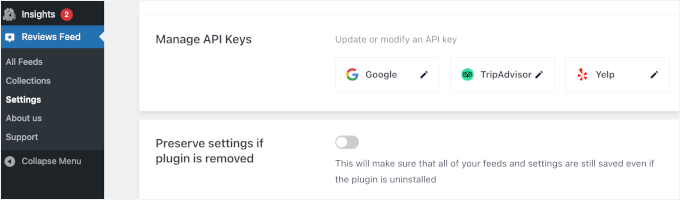
If needed, you can also update your API keys from here.
Overall, I recommend checking your reviews feed monthly to ensure everything is working smoothly. TripAdvisor occasionally updates its system, which can affect how plugins connect to its data.
When in doubt, don’t hesitate to contact Smash Balloon’s support team. They can help quickly identify connection issues that might not be obvious.
Bonus Tip: How to Show Your Google, Facebook, and Yelp Reviews in WordPress
TripAdvisor reviews are great, but combining them with reviews from other platforms can give your hotel, restaurant, or travel business even more credibility. Many businesses use reviews from multiple sources to give visitors a fuller picture of their reputation.
With Reviews Feed Pro, you can easily pull in feedback from Google My Business, Facebook, and Yelp — all using the same plugin and setup you’ve already learned.
You can create separate feeds for each platform and display them on different pages, or mix everything into a single rotating feed.
This works especially well because not everyone uses the same review site. Some people trust Google reviews most, while others rely on Facebook or Yelp when deciding where to go.
For a complete guide on setting up reviews from these other platforms, check out our detailed tutorial on how to show Google, Facebook, and Yelp reviews in WordPress.
Frequently Asked Questions About Showing TripAdvisor Reviews in WordPress
Here are the answers to a few common questions that I get about showing reviews in WordPress.
How do I extract reviews from TripAdvisor and add them to my WordPress site?
The easiest way is to use a plugin like Smash Balloon Reviews Feed. It automatically pulls your latest TripAdvisor reviews and displays them beautifully on your website (no need to copy and paste anything manually).
Does Tripadvisor have an API?
Yes. TripAdvisor offers an API that lets developers access business information and reviews directly. However, it’s mainly intended for approved partners and requires API credentials, which can be tricky to manage for most users.
Do I have to use the TripAdvisor API to show reviews?
No. With Reviews Feed Pro, for example, you don’t need to deal with complex API setups. You can simply connect your TripAdvisor page by URL, and the plugin will automatically fetch and display your reviews.
But if you prefer more control, you can still connect via API because the plugin supports both methods.
Keep Exploring: How to Add More Social Proof to Your WordPress Site
I hope this guide has helped you embed TripAdvisor reviews in WordPress.
However, adding TripAdvisor reviews is just one way to build trust and credibility with your potential clients. There are many other forms of social proof you can add to make your site even more persuasive and engaging.
Here are other guides you might find helpful:
- Social Media Cheat Sheet for WordPress
- How to Use User-Generated Content in WordPress to Grow Your Business
- How to Display All Your Subscriber Counts in WordPress
- How to Display Social Media Followers Count Text in WordPress
- How to Verify Your WordPress Site on Pinterest
- Best Social Proof Plugins for WordPress & WooCommerce
If you liked this article, then please subscribe to our YouTube Channel for WordPress video tutorials. You can also find us on Twitter and Facebook.
The post The Easy Way to Embed TripAdvisor Reviews in WordPress (No API Required) first appeared on WPBeginner.
n

n
KULIM, Oct 20 — Twenty-two people were injured, including one man who suffered a serious forehead wound, following a fireworks explosion at Paya Besar near here early today.
Kulim police chief Supt Zulkifli Azizan said the incident occurred around 12.45am when a large crowd had gathered along the road to watch fireworks.
“Several people were injured after the fireworks exploded unexpectedly.
“Two ambulances were dispatched to the scene to provide initial treatment before the victims were taken to Kulim Hospital,” he said in a statement today.
Zulkifli said one victim sustained a deep forehead wound measuring about five centimetres, while others suffered minor injuries.
He added that the situation was quickly brought under control after the injured were sent for treatment. — Bernama
n
Make no little plans. They have no magic to stir men’s blood and probably themselves will not be realized. Make big plans; aim high in hope and work, remembering that a noble, logical diagram once recorded will never die, but long after we are gone will be a living thing, asserting itself with ever-growing insistency. Remember that our sons and grandsons are going to do things that would stagger us. Let your watchword be order and your beacon beauty. Think big.
— Daniel Burnham, Chicago architect (1864–1912) (Hat tip: Erin, and the Summit folks.) (It’s an old quote but update in your head to include the ladies too.)
Since reading the Four Hour Workweek and Tim Ferriss I’ve been a bit of a bio-hacker, always trying weird and new stuff. Today was a new one! I did therapeutic plasma exchange (TPE), also known as plasmapheresis, which supposedly gives you all the benefits of parabiosis without, you know, needing to be a vampire or having a blood boy. So with the awesome folks at Extension Health I had my blood filtered and put back in, which took a few hours. My plasma was not as clear as Bryan Johnson’s, with 41 years of microplastics and mold and who knows what else in there. The process took a few hours, and afterward I got some chicken on rice from a Halal cart on Broadway so maybe it all evens out.
Hi there,
A release party is coming up on Tuesday, October 21, at 15:00 UTC for WordPress 6.9 Beta 1. It’s the first time for this release squad. Good luck!
Will you start testing WordPress 6.9 next week? You can use the Beta Tester plugin by Andy Fragen and install it on your test site. I am using WordPress Studio on my computer for systematic testing and prep work for the Source of Truth post to come out in a few weeks.
The WordPress Test team already published a few pre-beta calls for testing, you can work through, and they are preparing a comprehensive post for all of WordPress 6.9 testing for next week.
- Help test changes to template management
- Call for Testing: Ability to Hide Blocks
- Call for Testing: Accordion Block
WordPress 6.9 is a big focus of my work now. As always, I’ll keep you updated.
Have a fantastic weekend!
Yours, 
Birgit
PS: On Monday, October 20th, I will be on the 353rd episode of This week in WordPress show together with Michelle Frechette, Tim Nash, and the brilliant host Nathan Wrigley. You can join us live! 
PPS: This week, I celebrated the five-year anniversary of Gutenberg Nightly. 
Developing Gutenberg and WordPress
Yesterday, Matt Mullenweg talked briefly at WordCamp Canada, gave a demo, and then answered questions from the the audience. The wizards behind the scenes already posted the recording of the session to YouTube. WordCamp Canada 2025—Ma.tt Mullenweg “Town Hall/AMA”. If you rather read about the talk on Mullenweg’s blog, WordCamp Canada Talk. He also added the Q & A transcript as well.
 The latest episode is Gutenberg Changelog #122 – Gutenberg 21.8 and WordPress 6.9 with Beth Soderberg of Bethink Studio

If you are listening via Spotify, please leave a comment. If you listen via other podcast apps, please leave a review. It’ll help with the distribution.
Plugins, Themes, and Tools for #nocode site builders and owner
In his video AI Builds WordPress Blocks , Jamie Marsland introduced Automattic Telex and showed off about ten blocks he and other people built with it, like animated text, a countdown counter, and mermaid diagram and more. Check it out; it’s not only amazing, it borders on voodoo or magic.
Tammie Lister continues her October Challenge on the Blocktober.fun site. The latest blocks are Flip Card, Emoji Voting, Highlighter, Story Generator, Watermark and Make the logo bigger. You not only can try them all out on Telex and remix them with your own ideas. Lister also shares here elaborate prompts you can study and learn how to skill up your AI work.

Troy Chaplin released Block Accessibility Check v2.2! It introduces Heading structure validation, alt-text pattern detection and provides an upgraded URL checks with real TLD validation + dev environment support”Along with the new release comes a new dedicated website featuring improved docs, feature overviews, and developer API guide”. Chaplin wrote. The site is focused to assist content creators and developers alike.
Anne Katzeff shared how she created overlapping Columns with the Media & Text Block and little Additional CSS. The step-by-step instructions show you how you can build some dynamic layouts with the core block features.
Katzeff also posted a video of her process on YouTube. Overlapping Columns With the Media & Text Block.
Michael Manuel, WordPress VIP, posted a four-part series of short video: Behind the Build: How Christianity Today Modernized its Publishing Experience and how the team of WebDevStudios helped transform editorial workflows, infrastructure, and content operations for one of America’s most trusted media brands.
- Part 1: Editorial empowerment & workflow efficiency
- Part 2: Performance & platform modernization
- Part 3: Homepage & design system overhaul
- Part 4: Content migration & CMS modernization
Brad Salomons, 8r4d Consulting, Ltd, created the Panoramic Slider Block to scratch an itch. With this block you can post your Pano photos from your phone camera as it provides horizontal sliding controls.

Theme Development for Full Site Editing and Blocks
On the WordPress Developer Blog, Nick Diego published a Snippet on How to add custom blocks to navigation menus. It shows how to use the blocks.registerBlockType filter to extend the navigation block’s allowedBlocks array.
Elliott Richmond demonstrated how to create a block theme using Claude Code on YouTube. He built a theme from scratch with Claude Code, providing clear structure and Markdown tips for the AI tool. You’ll discover how to set up a CLAUDE.md file for AI-assisted theme development and how Claude works with the WordPress Block Theme structure.
Building Blocks and Tools for the Block editor
Muhammad Muhsin senior engineer at Fueled gave a talk on Building a Web App with the Gutenberg Framework at WordSesh earlier this year. What is Gutenberg as a Framework? It’s a way to use the block editor in a JavaScript application outside of WordPress. Muhsin “built CareerVision.io using Gutenberg outside WordPress—a standalone React framework for block-based apps”. You can watch the presentation on YouTube now.
Ryan Welcher was the Pro WordPress Developer Watches AI Build a Custom Block… and is Blown Away! He put Automattic’s Telex to the test, to build a live audio visualizer block inspired by the classic iTunes music visualizer. The AI writes the React code, handles audio input, and even makes the block respond to live microphone sound, all in about 15 minutes. It’s an impressive look at how Telex could reshape the way developers build custom blocks for WordPress.
JuanMa Garrido, developer advocate at Automattic, livestreamed his ongoing discovery of the Abilities API. He explored how to register custom abilities, expose them to AI models, and understand how this fits into WordPress’ broader AI architecture alongside the MCP Adapter and PHP AI API. The recording is now available on YouTube.
Questions? Suggestions? Ideas?
Don’t hesitate to send them via email or
send me a message on WordPress Slack or Twitter @bph.
For questions to be answered on the Gutenberg Changelog,
send them to [email protected]
Howdy and bonjour! First, thank you so much, merci beaucoup, for having me at your WordCamp. I love the spirit of local communities gathering and helping each other learn and grow together. I wasn’t actually planning to speak or even do a Q & A; I was just going to attend this WordCamp. But since the organizers have given me a bit of your time, I will try to make the best of it.
I love Canada. I first came here for the Northern Voice conference in 2006. Was anyone at that one? I think Dave Winer was actually there. It was a pretty awesome one. What’s that?
[Here I think Dave said he wasn’t at that one, but a different conference, but can’t remember.]
Well, that’s why we blog. My memory is not that good. [laughs] By the way, I think this week is your anniversary, right?
Dave Winer: It was actually a couple of weeks ago—31 years.
MM: Oh, wow. Thirty-one years. Round of applause! I think why I thought it was your anniversary is that on my blog’s related posts, it showed a post from 2014 that was congratulating you on your 20th because I think The Register or someone did a nice article.
So yeah, I’ve since been back dozens of times, including several summers in Montreal, at the jazz festival there—they also do Le Festival Haïti en Folie, and Just For Laughs—and a few times here in Ottawa, where I’m on the board of a cybersecurity company called Field Effect. We might even have some Field Effect people here—oh, hi! Thanks for coming.
Let me give a little update on what I’ve been up to. My life’s mission is to democratize publishing, commerce, and messaging. So I have some projects in each of those areas. In publishing, my main work is WordPress, the core software available to everyone. We host it on WordPress.com and Pressable, and allow others to host it with WP Cloud—a cool product—and we use Jetpack to bring all the best cloud features to every WordPress, wherever it is running. And, of course, running the main community hubs at WordPress.org, WordPress.tv, WordCamps, WordPress.net, which probably some of y’all haven’t heard of, et cetera, et cetera.
On the social side of publishing, I have Tumblr, which is a microblogging social network, but right now it’s on a different technical stack. I need to switch it over to WordPress, but it’s a big lift. It’s over 500 million blogs, actually, and as a business, it’s costing so much more to run than it generates in revenue. We’ve had to prioritize other projects to make it sustainable. It’s probably my biggest failure or missed opportunity right now, but we’re still working on it.
I’m really excited about the personal publishing side of our products: Day One and WordPress.com Studio and WordPress Playground. Day One is a fully encrypted, shared, and synchronized blogging and journaling app that runs on every device and on the web. You can also have shared encrypted journals with others. It uses the same encryption as one password. It’s the first place I go to draft an idea—for example, to write this talk. Its editor is not as good as Gutenberg yet, but it’s pretty decent at allowing multimodal input—which means you can record voice notes, draw things, etc.—and capturing it all. It’s mostly replaced Evernote, Simplenote, and even private P2s for me. It has some fun features, like when you make a new entry it records, the location, what music you’re listening to on Apple Music, how many steps you’ve taken, the weather. Honestly, some features that would be nice to get into WordPress, at least as a plugin. Right now, I just copy and paste it in the WC admin or the Jetpack app if I want to publish something; that could also be made smoother in the future.
So WordPress.com Studio is built on an open source project called Playground that we created to allow you to spin up WordPress in a WASM container in about 30 seconds, right inside your browser. Who’s tried Playground or Studio? It’s kind of wild, right? You know how hard it’s been to set up servers and databases and everything like that, and so to see a WordPress virtual machine spin up in like 30 seconds just blows my mind. There’s so much you can do with it. It’s the most sci-fi thing happening inside of WordPress right now, and we’ve just barely begun to take advantage of the massive technical and architectural shift it allows. For example, my colleague Ella builds an iOS app called Blocknotes. It’s a lot like Simplenote, but it uses a Gutenberg editor, and it’s entirely a WordPress playground instance—the entire iOS app.
Part of the evolution of WordPress has been going from a blogging system to a CMS to a full development platform. So what Dave talked about yesterday, and now that you can build entire mobile apps—which, by the way, can run on every platform, cross-platform, and run the same thing on the web—it’s kind of like a promise from back in the day of Java or other things, React, Native. It’s now very possible with this WordPress WASM stuff. WASM stands for web assembly.
The main distractions and things holding back WordPress right now are the legal attacks from WP Engine and Silver Lake—I can’t comment on that, but stay tuned for some major updates soon.
I forgot to put this in my post—WooCommerce! On the commerce side, there’s, of course, WooCommerce, which is very, very exciting. You can think of it like an open-source Shopify, our enablers here in Ottawa. It now processes over $30 billion of GMV (gross merchant volume) per year, and you can customize it to do pretty much anything: subscriptions, digital, physical goods, everything. And of course, it’s fully open source and built on WordPress. It’s actually a WordPress plugin, so pretty exciting. WooCommerce is now on about 8% of all websites in the world—WordPress is 40, so it’s running on about a quarter of all WordPress sites. It’s been a big part of the growth of WordPress, actually, the past few years.
In messaging, we have this product called Beeper. Anyone tried out Beeper yet? We got a Beeper super-user here, actually, in Robert. So Beeper basically takes all the different messaging apps—WhatsApp, Telegram, Instagram DMs, LinkedIn DMs, did you ever check those?—and it brings it all into one app, one interface, kind of like a Superhuman for messaging, and gives you cool features across all of them. Now this is obviously a pretty hard technical challenge, because we have to reverse engineer all the different networks for everything. But check it out, it’s a pretty fun little app. It’s, free for up to a couple accounts, and paid after that.
There’s also an open source component of that as well. We’re going to make it easier for people to build bridges and connections to different networks, because there’s a lot that we don’t support yet that we get demand for, like KakaoTalk in Asia. People also want to do dating apps, which I guess have messaging platforms. So it’d be pretty fun to have everything all in one.
I’ve been in the public a lot, doing lots of talks and actually blogging every single day now for 28 days, which will be 29 when we all hit the publish button at the end of this! So I’ve been blogging a lot. It’s a lot to keep up with. Actually been going every day since WordCamp US, with one missed day in there. I got very, very inspired at WordCamp US. It was a fantastic event. I got to hang out a lot and go to a bunch of sessions, and it inspired me to blog a lot more. If you run Jetpack, there’s actually a pretty cool feature where the notifications will tell you what kind of streak you’re on. So whenever I post, I get this nice little notification, like 28 days. And it has little easter eggs when you get certain number of days in a row, which is fun. So I’m gonna have to add some of this to the post later—I riffed a little bit. We’ll get the recording. So now that this is all done, we can push the publish button together.
This is a cool device called a Daylight computer. So cool. It’s from a startup I’m invested in through Audrey Capital and Automattic. Think of it like a cross between a Kindle and an iPad. It works in the daylight, hence the name—it doesn’t emit any blue light. It’s great for kids. You can order it on DaylightComputer.com. It runs Android, so it’s super hackable. You can have apps like Beeper, Day One, WordPress, Jetpack, WooCommerce on it. Very, very neat device. I actually have WP Admin loaded right here; you can see you can scroll like super, super fast. Soon the wifi is going to work—it’s a wifi-only device.
Later I’ll update this post with an mp3 recording enclosed an RSS in honor of Dave Winer, who spoke here, who invented podcasting and RSS. And actually, if you go way back in my RSS feeds, I have some mp3 enclosures from 2004 and 2005, some very funny early podcasts. Also, whenever they post this video to WordPress TV or YouTube, I’ll share that too, and I’ll add some links. Thank you. Merci beaucoup! If you want to follow more. Please check out my blog at ma.tt. No WWW, no .com. Just ma.tt. I cross post to ma.tt on Bluesky and Mastodon and on Tumblr, Instagram and Twitter/X at @photomatt.
And now we’re going to push the button together. Y’all ready? Murphy willing, are you ready to publish? think I need to add a category and stuff, but I’ll do that later.
Q: Hi, I’m Michelle Frechette, and I drove up from Rochester, New York on Wednesday, so it’s good to be here. [Applause] I love that our open source extends beyond just publishing websites and words, and that we have, for now several years, the photo directory, which is available to people—and we are closing in on 30,000 published photos, which I think is phenomenal.
MM: And all of those are, I think, CC0, Creative Commons Zero-licensed. So it’s compatible with GPL, embedded in WordPress themes. You can use it on your site. It’s very cool.
Q: Yeah, you don’t have to give attribution to anybody. You can just use the photos that are there, which I think is good. What are we going to do so that more people know that it exists, besides the 10,000 people who have submitted photos, because I think it’s still, it’s it’s growing. It’s huge. There’s a million beautiful there’s almost 30,000 beautiful photos in there, but I don’t think enough people know that it exists yet. So how can we get the word out, to get more people to use it?
MM: Well, I think first we should ask questions about it at WordCamps.
Q: I’m on it.
MM: So check. We’re actually just kind of on like a Version One of that whole idea. So in my mind, for things that we should do, is 1: I think we need to better integrate finding those photos in the media library, because right now, it’s kind of like you have to click a few buttons to get to it. 2: I would like, for every single WP admin when you upload a photo, for you to be able to set the licensing to it. And if it is licensed as CC0, we can submit it to the directory. And of course, the directory has some extra rules, right? Some of these rules, I think we might be able to re-examine now. So for example, right now, in the directory, we don’t allow anything that shows someone’s face, right? And the reason for this is, even if something’s CC0-licensed, to have someone’s face, you need a model release form. There’s different laws for that in different countries and things like that make sense, right? You wouldn’t want someone to take your photo at a WordCamp, and now they think it’s CC0, and you start seeing them running ads for, you know, some sort of new medicine or Viagra or something; it could be very embarrassing. However, when AI creates a face, there’s no such restrictions there. So something that we could actually start to do, because right now I think we have some anti-AI rules in the photo directory, I think we should probably start to look at evolving that. So, for example, you can take a picture of me right now, change my face with AI to a face that has never existed, and that could be CC0-licensed and anyone in the world could use it. So I think there’s some possibilities there.
Because right now, the laws for AI-generated stuff vary from country to country. I think right now in America, it can’t be copywritten, at least in the same way. At least if it’s fully created; when a human starts to modify it, it can be. Sometimes I’m not familiar with the laws here yet, but I’m sure I’ll look them up later. So I think that would be a pretty interesting way to open it up right now, because in theory, we should have way more than 30,000 photos. Actually, I have 30,000 photos on my site, which are mostly GPL-licensed. So how can we—yeah, I do need to submit them. Some of them are already in WordPress Core. So remember the Twenty Ten theme, which has like the little sheep. People really love those sheep. So all those photos I GPL-licensed a long time ago—in my copious free time, yes.
So I think those are some of the ideas for it. And also think about another project we do that people aren’t as familiar with, Openverse search. Has anyone used Openverse yet? It’s pretty cool. So actually, Creative Commons, the nonprofit, used to have a search engine that indexed the entire web and would allow you to find different types of Creative Commons content, including that requires attribution or other things. The foundation actually was shutting this down, and we took it over, and we now run it on WordPress.org We renamed it to Openverse instead of Creative Commons, but they still index the entire web, including audio files, video files, images, all sorts of stuff. So it’s a very, very cool project. It is embedded in WP Admin a bit, but again, we probably should combine that with a photo search and other things.
I also think there’s some opportunities to use AI analysis of all the photos to give a better semantic understanding and a better search that we currently offer, which right now is typically monollingual, I don’t think it translates well into the, you know, 60-plus languages that WordPress supports, and it’s manual tagging. So there might be things to do, like a more automated understanding, which, of course, gets better over time. You know, we started to incorporate some of the AI models like Gemini and other things on WordPress.org to make us way more efficient on things like plug-in submissions and some code scanning. I actually think we’re very much in chapter one of where this is going to be. It can sort of massively [grow]—because WordPress.org relies on volunteers, basically. Some people are sponsored, but most are not. And we’re over 60,000 plugins now, or 10,000 themes, and actually, the rate of plugin submission, I think, has basically doubled since last year, and the team has gotten it down where before they had a six-month queue, they’ve got it down to basically under a week. So you know, we can definitely automate more and more and more and be vastly more efficient and support way more developers and more users, way more everything, and probably improve the code quality. So that’s another thing I’m pretty excited about.
Q: I love it. WordPress.org/photos, if you want to look at it.
MM: Thank you, Michelle!
Q: Hey, Matt. Courtney Robertson. Kind of related to Michelle’s question: This week, I saw Nick Hamze recounting how when you go to submit a theme, the image that’s in the preview for the theme, if it is AI-generated that that’s getting rejected and the nuances Dion dug into—Dion is one of our long time core commiters, core leads, etc, in the project. A hidden gem. If you haven’t encountered Dion yet, please find Dion and meet him. So Nick is learning the legal ramifications of having an AI-generated image as part of the theme directory, like what we have to do in the theme directory. Because if the image that’s in the theme is generated by AI, there’s a lot of legal stuff about, can we do it? Can we not? And we would all like to just be like, “Yeah, whatever. Move on.” But then there’s some other ramifications. Is that on your radar? I know we’ve looked at criteria of what could go into the theme repo and some of those deals. I don’t know if. I mean, once we get into legal stuff, that’s maybe beyond you and I.
MM: Well, unfortunately, I’m getting really good at legal stuff. [Laughter] It wasn’t on my roadmap for the past year or two, but yeah. So this is very much an evolving area, and the laws from country to country do vary a lot. However, there’s also some common sense things you can apply, and I think that there is a sort of rapidly—we’re not putting the genie back in the bottle with AI stuff. One, just the companies; like, OpenAI is just too big to fail now. The entire economy and growth is based on these systems. The infrastructure buildouts, massive data centers, everything. It’s kind of incredible. Not to mention the usage, like it’s really transforming translation, code, so much.
Now, WordPress.org, particularly, because a lot of this is volunteers, those folks aren’t comfortable making big policy decisions like this that could have ramifications. They already put a lot on the line. I kind of shield everyone from a legal point of view and everything like that, but in theory, people could go after them, and we have had instances where some of these folks can get oppressed by someone who gets something rejected, or banned from the forums for spamming or stuff like that. So we do try to provide some shelter.
Now, on this issue, in particular, Nick is someone I talk to almost every day. He’s doing some very, very cool stuff across WordPress and some innovative things with themes. I like that he pushes the boundaries. So for example, right now, the theme directory is fairly conservative in for example, with the intention that we want the demo to look like the theme when you install it, or we don’t want it to rely on a plugin. And part of the intention there is that for WordPress, we want you to be able to switch between themes really easily. So one of the beauties of it is that you can take your entire blog site, click a button, and you have a brand new design. Now themes, as they start to incorporate more advanced functionality—which is pretty cool—those sorts of things aren’t allowed. In fact, one of my favorite examples of something that was in the theme directory a long time ago and is not allowed on the current guidelines, that I think we’ve made an exception, is the Command Line theme. Has anyone seen this? You load it up, it’s like a blinking terminal, and you interact with it by typing in commands, like “list,” “post,” and you can type “help,” and it gives you all the things. This is so cool! By the way, I don’t think it complies with, like, any of our standards. [laughter] Like accessibility, it probably breaks some rules there, all sorts of things.
So I think part of it is, you know, how can we move? And I think Nick even did a post about this, like rules versus guardrails. So I think part of the way we can do this is as a marketplace. Right now, there’s certain things that we don’t allow, and in fact, those rules creep up and get bigger every time, right? Because each sub-team comes in and says, “Oh, I need my rules to be requirements.” Actually, accessibility is a great, great example of that. Now, I think what’s interesting in a marketplace is we can move these things from being rules to being like tags. So for example, if you were a university, you only want to see themes that were WCAG 2.0 or higher compliant—which are by the way, some pretty strict requirements that don’t apply to many websites, for good reasons, but that was a requirement. You should be able to do that as a search. Or if you want to see themes that are orange, or all these sorts of things: I feel like those should just be tags in the marketplace, and use the rating system as well to open up what we can host, but then give better tools for people to search and choose what they want.
Q: Thanks. Just a shout out. Please let Nick know that a lot of us are reading what he’s putting forward, and I forget his exact website domain. It’s Iconick.
MM: It’s spelled in an interesting way.
Q: Yeah, it has his name in it. I wonder where he got that idea. [Laughter]
MM: Yeah. So it reads as “iconick.” Nick Hamze, H-A-M-Z-E. Google him. He’s got some really cool themes. He’s done a lot of cool projects, a bunch of Wapuus. Actually, I’m talking to them about how we can upgrade all the Wapuu stuff. By the way, y’all have some awesome ones at this event. I got the little swag pack with all the stickers and everything. All the sponsors have different ones. You have like, four or five of them. I’m actually gonna put this sticker on my laptop later, probably that WCF one, so keep an eye out for that.
Q: Paul Bearne. I want to talk about Hello Dolly, the plugin, which shipped with Core.
MM: Which, by the way, people tried to get rid of because of copyright issues. Yeah, there’s actually some interesting things we did to get around that and make it fair use.
Q: Should it be removed?
MM: You’re asking the wrong guy.
Q: Well, it’s there because nobody wants to ask you to come and remove it.
MM: No, they ask me like once a year. [Laughter]
Q: If it stays, perhaps we could redo the description to indicate that it’s historic—it was the first plugin, it was the proof of concept—but please don’t copy it. It’s no longer good code.
MM: I completely disagree with that. Tell me why it’s not good code. Because it doesn’t use classes or object orientation? Why is it bad code?
Q: It’s not accessible, it’s not translatable.
MM: It is translatable. It actually goes through the translation functions.
Q: There’s no translation around the strings.
MM: That’s not true.
Q: ’Tis true. [Laughter]
MM: Then it was removed because it was one of the first things we did the underscore for. Well, let’s look it up later today, but it’s not true that no one’s ever asked me. It does get asked about once a year. There’s lots of issues on the bug tracker about it. And if there’s ways to improve it, like make it translatable, I think that’s great, and I know people have actually used that before to also just change the lyrics to, like, put different songs in there, different things they want to
say.
Q: When it becomes translatable, the [inaudible] can have more fun with the translation strings.
MM: Yeah, but they don’t have to, right? That’s the fun thing.
Q: Then I look forward to some patches.
MM: What I don’t want to do is, I don’t want to make it super-complicated. I know we did some things, like we moved it to a sub-directory. It actually just used to be a single file, so there have been some minor upgrades there. But the whole idea is to show how easy it is to use the actions and filter system inside of WordPress.
Q: There are no actions or filters in that plugin.
MM: Yeah, that’s how it looks in the WP Admin.
Q: There’s no filter on the string
MM: Well. we can add a filter on the string. And maybe it’s, it’s actually a filter and not translation, might be actually better, because, like you said, like maybe the pot system is not appropriate for that. Although, why not? Like, I’m sure you can translate those lyrics to French and other things, they would be meaningful. And also the connection to jazz musicians. It was one of the first famous jazz songs by one of my idols, Louis Armstrong, and you know, since then, we’ve named every release of WordPress in honor of a jazz musician. So that’s one of the cool things about WordPress versus other software is it has soul. You know, it’s true. Code is poetry. You know, we honor musicians and artists. You know, one of the first blocks we did in Gutenberg was actually a poetry block, a prose block. Has anyone used this one? It’s one of these things people are always like, “we should remove this.” [Laughter]
Actually, I did it because I took a writing poetry course, and the author, a famous poet, was complaining how, when she posted to WordPress she couldn’t have the formatting correctly—you know how a lot of poetry will use interesting formatting where the white space has significance? Or spacing that has kind of unusual things? So the behavior of the editor, which takes multiple line breaks and combines into one, and other things, all that was being collapsed. And so I said, “Oh!” I think it’s called the Prose block, but it’s basically a block inside Gutenberg that preserves white space, kind of like a “pre” tag, and it’s used by some of the poets out there. So sometimes we do these really niche features for like, very high-end users. So for example, I think three or four of the living Fields Medalists use WordPress—actually, WordPress.com.
Does anyone know about the Fields Medal? A couple people. So it’s a math award. It’s more prestigious than a Nobel Prize. They give away a Nobel Prize every year. This happens only every four years, and some of the smartest people in the world have it, like Terence Tao, who is, if you don’t know about him, look him up. He is probably one of the top five smartest people in the world, amazing, brilliant mathematician—he actually just got defunded, but the Simons Foundation is now sponsoring all his work, which is very exciting. If you don’t know Jim Simons, he’s the founder of Renaissance Technologies. Has anyone heard of Renaissance Tech? RenTec? One or two people? Oh, I’m telling you all sorts of cool stuff now.
So Renaissance Technologies is the most successful hedge fund ever in history. They show, I think, annualized returns of over 40% over 35 years. It’s actually physicists and mathematicians that came together. Jim Simons was one of them, he went out of business or bankrupt or something, and was like, “gosh, I need to make some money. Maybe I’ll check out the stocks and trading thing.” And they started out, and they actually did really well, but then in the 80s, it all crashed. Jiim’s big, big innovation was that he invented algorithmic trading. So he basically said, we have humans making decisions. One, they’re too slow. And two, we don’t know why it’s working. And so there must be some fundamental sort of physics or rules of the trading markets and the business systems. And so RenTec started to gather the most data of anyone in the world. The next hedge fund to do this well was Bridgewater, but basically they started getting data sets, like shipping back to the 1400s, like really obscure things. They go get stuff out of books and develop all this priority training data, use it to map the economy and essentially create these models that the mathematicians would come up with. You can only be an investor in this fund if you work for the company, which is pretty interesting. And of course, everyone there is like a decamillionaire and everything. I forget how many employees—200 or 150 or something. Really, really small. So legendary. And he passed away a few years ago, but his foundation funds a ton of fundamental research and physics and math and so he’s someone I really look up to and admire. I blogged about him earlier last year. He reminds me a lot of my dad, just the way he looks and talks. My dad passed away in 2016, so I really like watching Jim Simon’s stuff.
Oh, I forgot to say, the point of the Fields Medalists. The reason the Fields Medalists use WordPress is we support a LaTeX plugin. LaTeX is basically like a markup language for doing advanced math formulas. We’re actually working on an update to this to be a bit more user-friendly. We added support for it in 2005 because Terence Tao started a free WordPress.com account, and he was complaining about this and embedding these images. I followed his blog, and I was like, “oh, we should make a block for this kind of shortcode.” And this shortcode is actually built into Jetpack, so anyone who runs Jetpack has access to this, and it’s now a Gutenberg block as well. So we’re adding diversity. So maybe tell the math department here. It’d be awesome to get some more mathematicians and folks on WordPress.
Q: Matt, just want to give you a heads up. We’ve got about five minutes left.
MM: All right, rapid fire. Should I do some fast ones? I just need to talk a little less.
Q: I’m Chris, I work for Pantheon. As you obviously know, Pantheon does Drupal stuff. So I know WordPress, but I have been watching, particularly, the evolution of their development work in AI, specifically integration in the Drupal admin, and also how the Drupal CMS is onboarding new users to Drupal, and the Experience Builder that they’re building. As we gather here today, probably most WordPressers might not be aware that there’s actually DrupalCon Europe happening in Vienna right now, and there’s lots of things that are happening out of that. And there’s a lot of really interesting and exciting things happening in that Drupal space. I know you’ve had conversations with Dries, because at least Dries says that you’ve had conversations.
MM: We talk semi-regularly. You know, there’s only there’s like a dozen people in the world who, like their whole life, is creating CMSes, Dave’s actually one of them in the room. We’re just going to do it the rest of our lives. And Dries is one of them, so I have incredible respect. We actually did a talk together with Mike Little, the co-founder of WordPress. So if you look up Dries, Mullenweg, Mike Little, you’ll you’ll find this. It’s pretty cool talk. Actually, we got to talk about the history and everything.
Q: So the question here is: To what degree are you looking at or thinking about the types of developments that are happening in Drupal but other CMSes as well, and what can we, as WordPress, learn from those other ecosystems?
MM: Oh, it’s a great question. I’ve got to look up the user ID. I think I was one of the first couple hudnred people registered on drop.org, which is the predecessor to drupal.org. Dries was actually at that Northern Voice conference in 2006; he has a post about it on his blog with some photos. So yeah, I keep in pretty close contact with a number of the other CMSes. Well, I won’t say close contact, but usually about once a year we’ll get together with Anthony from Squarespace, Tobi from Shopify, with Dries, whenever we’re in the same country, or I’m over in Europe or Boston. I try to look them up, and I test out things pretty regularly.
So I haven’t seen the very, very latest stuff for Drupal. I think I checked out one of the last iterations they did. I love that with companies like Pantheon now doing both WordPress and Drupal, we’re getting a lot of overlap between the communities. So I would say, please bring this stuff over. I mean, we’re both PHP, we’re both GPL. It’s one of the reasons I’ve always really supported Drupal, even though we’re kind of mutually exclusive solutions. I’m always going to be supportive with other open source projects. So yeah, for those people who overlap, like yourself, please make some suggestions. You know, start a P2 post, or do a blog post about it. We’ll get it in the newsletter, or maybe even if there’s something specific that we could bring over code wise, we can start to get that incentive into Trac and everything. Cool.
I think Drupal also has a plugin to use Gutenberg, right? Yeah, which is pretty cool. It was one of the reasons we designed Gutenberg to actually be portable to other CMSes, and why we’ve been putting it under license, dual-licensing it so to be embedded even more places, not just GPL.
Q: Forgive the AI translation of my words, but it’ll help me be concise. But here’s the question. Really, really simple—no, it’s not. WordPress has always thrived because of its open, community-driven ethos, but as the ecosystem grows, we’re seeing more like large, profit-driven players who don’t necessarily share the values. How can individual contributors and agencies like ours actively help protect WordPress and uphold the values and ethics that have sustained it from bad actors and people who might try to exploit the community? And do you see room for something more formal, like a certification for individuals and agencies that define what being a good actor is, to help educate clients and even the market, to help protect in a more proactive way from those sorts of bad actors?
MM: Well, that’s a big question. I’ll try to answer quickly. So first I will say, I don’t want to say that there’s bad actors. I think there might be bad actions sometimes, and just temporarily bad actors who hopefully will be good in the future. You know, every saint has a past, every sinner has a future. I never want to define any company or any person as permanently good or bad. Let’s talk about actions.
Second, I think with these actions, we can start to create incentive systems, and it’s part of what we’re doing with Five for the Future, which is basically saying, you contribute back—which also implies that you’re not violating the GPL, or something like that. So we’ve got the hard stuff, like, if you violate the GPL, you’re gonna get a letter. Violate the trademark. You know, that was more of a legal thing. But also the gentle stuff, like, how can we encourage good behavior by giving people higher rankings in the directory or in the showcase, for example?
Then finally, I’ll just say, vote with your wallet. Each one of you here has the ability to strongly influence these companies. If they’re commercially motivated, great, let’s commercially motivate them to do the right thing by giving more business to the good companies and less business to the other companies. This has actually been happening a lot the past year. I think I can say this: There’s a site called WordPress Engine Tracker which is currently tracking a number of sites that have left a certain host. It’s about to cross 100,000 that have switched to others host. And 74,000 have gone offline since September of last year. We actually used to make all this data public. The whole list was on there. They got a court order so the data could be fact-checked by press or other people. There was actually a court order that made us that down. So again, trying to muzzle free speech and transparency. But you know, we’re allowed to keep that site up, so check it out while you can.
Do we have time for one more. Is this last one?
Q: Okay, I don’t think this qualifies as rapid fire, but it’s a softball. First of all, I came to WordPress as an open source advocate. I became a b2 user. That’s how I got to WordPress. So my all-time favorite WordPress release is 1.5, because it has what I consider a killer feature. It’s not the one you’re thinking. It’s pages.
MM: 1.5 right? Yeah, I remember introducing that. Originally. I had a different CMS I was going to release called ContentPress. Or Multipattern. I wasn’t sure what to call it, and so I had this whole other CMS. And I was like, man, we should just build this into WordPress, even though it’s a blogging system. I think having this pages feature put us ahead of Movable Type and others. So yeah, glad we did. I think we introduced themes and that I released him.
Q: Yes, themes was the was kind of the obvious big feature for it, but pages is the point at which I would say that WordPress went from blogging engine to CMS. So that’s my favorite. But what I was going to ask is—
MM: So it’s all been downhill since then?
[Laughter]
Q: No, it was such a pivotal moment that helped with WordPress’s meteoric adoption rates. And for me, personally, at that time, it allowed me to take a whole bunch of static HTML and bring it into WordPress so I could manage it so much more easily. So my question was: can you tell us a story, or give us some fun facts about that? Softball question, unless it really taxes your memory.
MM: Well, luckily I blog. I’ll say that two of my favorites ever in history are 1.2 and 1.5—which actually came out right after each other, because we skipped a few releases; it was a time when we actually got pretty delayed. So 1.2 introduced the hooks and filter system, which was pretty revolutionary, I think still, as a unique programming paradigm. But before that, to modify WordPress, you’d actually open up files and change lines. I used to publish these, we called them hacks, and they were. At one point we introduced the hacks file, which made it a little bit better. But then our plugin hook system allowed a separation between the core and the add-ons, but you could go really deep to modify things. Then 1.5 was themes, I believe. So 1.2 was plugins, 1.5 was themes. And then the other big one—I think it was 2 or 2 point something, was when we introduced WYSIWYG for the first time. Which, by the way, was so controversial; people did not want basic WYSIWYG in WordPress, which was funny, like 10 years later, when they’re like, “Okay, this Gutenberg thing’s even worse.” I was like, “Ah, I’ve been through this before.”
So I think that those are kind of the fun stories around there. Again, some of this stuff was pretty slow to be adopted at first. I wasn’t certain that this should be rolled into WordPress or there should be separate software, but I’m glad we did. You know, Movable Type was a dominant thing at the time, and their static page functionality wasn’t very robust. And so the other thing that WordPress did around this time that I thought was pretty awesome is really clean URLs. So where, prior, you know, people would have crufty URLs, like they’d have an ID in the number, or you’d have for WordPress,—the default’s still there, actually—is like “?p=123,” so creating the mapping system where we map dates, a hierarchy, and these clean slugs to the pages in the back, in the browsing system, essentially, I think was really crucial. And I love that URLs from 20-something years ago still work or redirect to proper things today. So I think that’s really, really important. Thank you. All right. Last one,
Q: Hey, Matt. I’m Raquel, and I love kitties and surprises. Just some facts. I have a another question around the community. I want to know how do you feel, what are your raw thoughts, on independent WordPress events that are happening in our space now?
MM: And do you want to disclose anything there?
Q: I mean, I am the one responsible for PressConf, so independent WordPress event. So, yeah, how do you feel? I’m just curious as to how we can all get better together, which tends to be my motto.
MM: I’m very much like a “let a thousand flowers bloom” kind of guy. So thank you. I know it’s a huge labor of love doing something like PressConf. That’s something that’s been very active in WordCamps and other things in the past, and hopefully with WordCamp US going to Phoenix, we’ll have an opportunity to do some work together there.
So I think that’s my fundamental, you know, raw thoughts. You know, I do think about, you know, what do we want to encourage in the world as well? So I would just encourage you as an independent organizer. You know, there’s some beauty there that you don’t have to follow the rules or guidelines necessarily. And it’s commercial events. Well, like the tickets cost more than WordCamp and stuff, right? How much is a ticket?
Q: Depending on early bird to total, $700 average.
MM: And so that’s a bit of a smaller event, right? That’s part of what people like about it. So the ticket price actually becomes like a little bit of a barrier to entry. It’s more intimate. You get some really awesome attendees and talks there, as I think about this as well, just like, you know, what do we want to see more of in the world? And, you know, trying to focus time, particularly my time, to those types of things. So that’s why I came to WordCamp Canada. You know, this is not the biggest WordCamp in the world, but man, this spirit here, and the people and the everything, and like you know, what you’ve all put together, as it’s come together over the past few months, the incredible work of the organizers,the social media team’s been doing a great job getting some awesome speakers like Jill and Dave and like, I was like, man! That’s why I was just planning to come and attend. You know, just to check it out, because I was very interested in the content and everything y’all put together. So again, I guess we’re out of time. So I just want to say thank you. Thank you. Thank you. I’m going to run to the restroom, but then I’ll be right back out in the lobby. I’m going to take pictures, shake hands, kiss babies.
[Laughter]
I can shake the hand of a baby too. It’s whatever. I’m open-minded. But hey, thank you. I appreciate it.
Update: The video is up, it’s pretty bad I think the audio is pulling from a DJI thing not the microphones, but here it is.