
Kdenlive vs. Shotcut: Two Powerful Open-Source Video Editors Compared
Introduction to Kdenlive
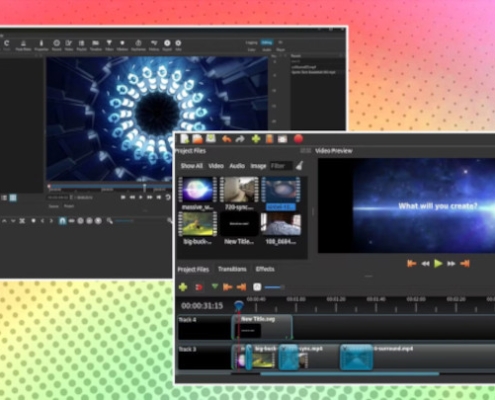
Kdenlive (KDE Non-Linear Video Editor) has emerged as one of the most popular open-source video editors, originally developed for Linux but now available across all major platforms. Born from the KDE community, it combines professional features with an approachable interface that has won over both hobbyists and semi-professional editors.
Key Features of Kdenlive:
-
Multi-track editing with unlimited video/audio tracks
-
Proxy editing for smooth playback with high-resolution footage
-
Automatic backup and crash recovery
-
Configurable interface with dockable panels
-
Keyframeable effects with a wide selection
-
Title editor, audio mixing, and color correction tools
-
Hardware acceleration support (VA-API and NVENC)
What makes Kdenlive particularly appealing is its balance—it doesn’t overwhelm beginners but doesn’t limit more advanced users as their skills grow. The recent versions have focused significantly on stability and performance, addressing earlier criticisms about reliability.
Head-to-Head Comparison: Kdenlive vs. Shotcut
1. Interface & Workflow
Kdenlive uses a traditional multi-panel interface similar to professional editors like Premiere Pro, with separate panels for project files, monitor preview, timeline, and effects. This can feel more familiar to users transitioning from other professional software.
Shotcut opts for a more minimalist, single-window approach with a playlist-based workflow. Its “Recent” panel prominently displays recently used files and features, which some find more intuitive for quick projects.
Winner for traditional editors: Kdenlive
Winner for minimalists: Shotcut
2. Performance & Stability
Kdenlive has made tremendous strides in recent years, with version 20+ marking significant stability improvements. Proxy editing works exceptionally well for 4K footage. However, on some systems, it can feel heavier than Shotcut.
Shotcut is generally lightweight and responsive, with excellent format support since it uses FFmpeg directly. It tends to be more conservative with system resources.
Winner for heavy projects: Kdenlive (proxy workflow)
Winner for older hardware: Shotcut
3. Features & Capabilities
Kdenlive offers:
-
More sophisticated titling with template system
-
Better audio mixing with waveform display in timeline
-
Ripple and roll editing modes
-
More comprehensive effect keyframing
-
Built-in screen recording
Shotcut excels in:
-
Superior format support (edits natively without importing)
-
Advanced color grading with scopes (vectorscope, histogram)
-
Filter chains with more granular control
-
360° video editing support
-
Better webcam capture integration
Winner for general editing: Kdenlive
Winner for technical workflows: Shotcut
4. Learning Curve
Kdenlive has more tutorials available due to its larger user base. The interface, while busier, follows conventional editing software patterns that many find logical once learned.
Shotcut has a shallower initial learning curve but some unique workflows (like its filter system) that require adjustment for users from other editors.
Winner for beginners: Slight edge to Shotcut
Winner for long-term growth: Kdenlive
5. Platform Support & Development
Both editors are cross-platform, but Kdenlive has deeper integration with Linux desktop environments (especially KDE Plasma). Shotcut maintains excellent consistency across all platforms.
Development pace is active for both, with Kdenlive having more frequent minor releases and Shotcut maintaining a steady update schedule.
Related articles:
1. A Beginner’s Guide to Using Clonezilla
2. A Beginner’s Guide to Using FileZilla for File Transfers
3. An Introduction to open source Linux Mint
4. Introduction to WordPress: The World’s Most Popular Open-Source CMS
5. How to Install WordPress on Your Hosting Account
6.GitHub: The Beating Heart of the Open Source Community and Why You Should Be a Part of It
7. Drupal: The Powerhouse CMS That Pays in Learning, Not in Clicks
8. LibreOffice: The Powerful, Free, and Open-Source Office Suite You Should Be Using
9. The Bulletin Board Blueprint: Why phpBB Reigns Supreme in Open-Source Forums
10. Reclaim Your Inbox: A Guide to the Thunderbird Email Client
11. Unleash Your Creativity: A Guide to the Free & Powerful GIMP Photo Editor
12. Open Source Software for Personal Productivity
13. Top Open-Source Auto CAD Alternatives
14. Manjaro: The Gateway to Arch Linux Made Easy
15. The Rise of Open Source AI Video Editors: A Comparative Analysis
16. Open Source Powerhouse: An Introduction to OBS Studio
Leave a Reply
Want to join the discussion?Feel free to contribute!